
Getting your first client on Upwork is a process, not a lottery ticket. Beginners who treat it like one — mass-applying to every job post with a generic proposal — usually burn through their Connects budget and conclude “Upwork doesn’t work.” Beginners who treat it like a system — a complete profile, selective proposals, real cost math, and scam awareness — give themselves a genuine shot. This guide walks you through that system, step by step, using Upwork’s actual 2026 policies and costs. No step here guarantees a client; every step here improves your odds.
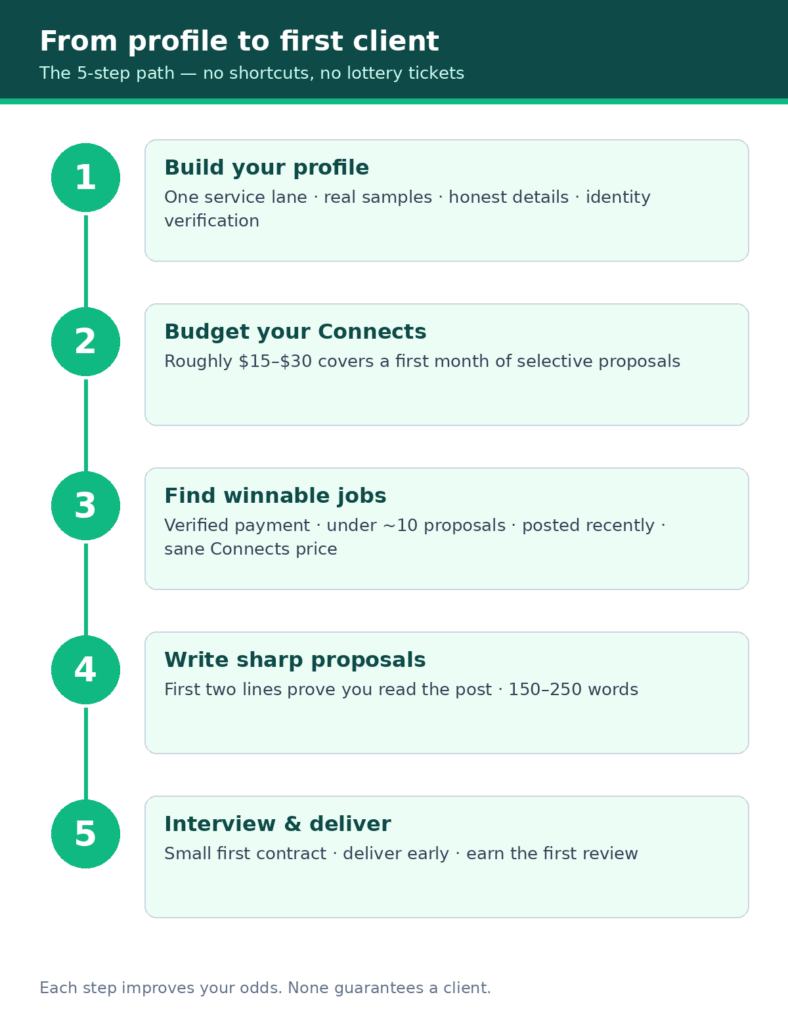
Quick answer: To get your first Upwork client: (1) build a 100% complete profile in one clear service lane and pass identity verification; (2) budget for Connects — proposals cost real money ($0.15 each, several per job); (3) apply selectively to recent posts from clients with verified payment methods; (4) write proposals whose first two lines prove you read the job; (5) interview professionally and start with a small, well-defined contract; (6) deliver early and earn your first review. Expect the process to take weeks, not hours.
The real costs before you earn a dollar
Most “how to get clients on Upwork” guides start with profile tips. That’s the wrong starting point, because Upwork charges you to apply for work — submitting proposals costs Connects — and beginners who don’t budget for it quit before the system can work. (Browsing job posts is free; it’s the proposals that cost money.) Understand the costs first, then decide if the game is worth playing.
Connects: the price of applying
Upwork uses Connects, a platform currency you spend to submit proposals. Each Connect costs $0.15 — no bulk discount — and every job post shows its Connects price before you apply. Costs vary per job based on size, scope, and market demand — Upwork shows the exact number on the job post before you apply, and publishes no fixed range, so always check before spending. Creating your profile and browsing job posts is free — Connects are spent when you submit a proposal. (Upwork’s official Connects guide has the current details.)
What that means in dollars:
| Connects per proposal | Cost per proposal | 10 proposals |
| 4 | $0.60 | $6.00 |
| 6 | $0.90 | $9.00 |
| 10 | $1.50 | $15.00 |
| 16 | $2.40 | $24.00 |
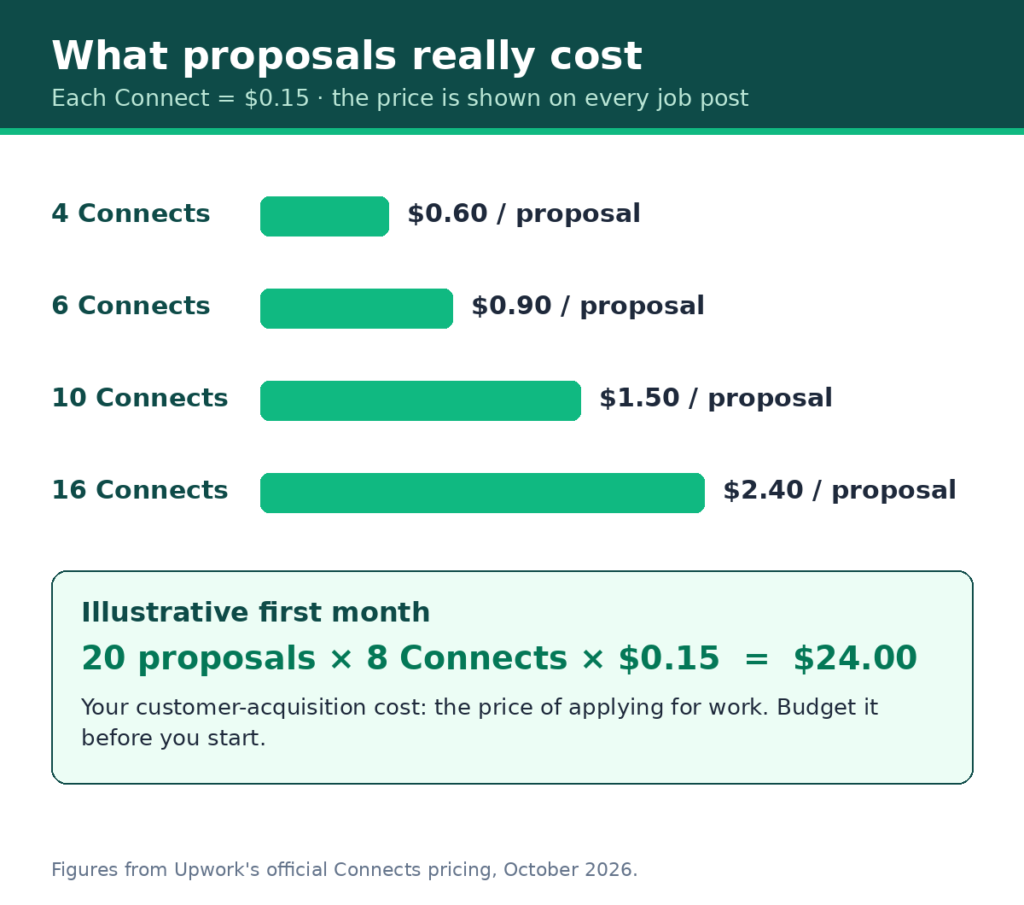
Calculation shown: 6 Connects × $0.15 = $0.90 per proposal; 10 proposals × $0.90 = $9.00. For 25 proposals, multiply the 10-proposal column by 2.5 — at 16 Connects per proposal, that’s $60 before you’ve earned anything.
Where Connects come from:
- Freelancer Basic (free): you may receive 10 Connects per month — Upwork says this isn’t guaranteed, so check your account rather than counting on it.
- Purchased bundles: sold in set bundles (e.g., 10 for $1.50, 80 for $12) or custom amounts; a verified billing method is required to buy them.
- New-freelancer bonus: you may receive a one-time 50-Connect bonus after your first Connects purchase or Plus upgrade — eligibility is shown at signup, not promised to everyone.
- Rising Talent badge: a one-time 30-Connect bonus if you’re awarded the badge (more on this below).
- Activity rewards: twice per calendar month, submitting 3+ proposals while spending at least 54 Connects may earn free Connects — Upwork describes this as a test program that isn’t guaranteed even when you meet the criteria, and its own pages currently disagree on the amount (12 vs 18). Check your Earn Connects page for what applies to your account; don’t budget around this reward.
Connects are returned — not cash-refunded — if the client cancels before a contract is made or Upwork removes the post for a terms violation. They are not returned if you withdraw your proposal or the post expires. Every proposal you send is a small, non-refundable bet. Budget accordingly.
A realistic first-month Connects budget (illustrative)
Say you plan to send 20 proposals in your first month at an average of 8 Connects each: 20 × 8 × $0.15 = $24.00. If 10 free monthly Connects arrive on your Basic account, your out-of-pocket cost is roughly $22.50 for 150 additional Connects. That’s your customer-acquisition cost — the price of applying for work. If $25 feels like too much to spend before earning, Upwork’s proposal marketplace may not be the right starting channel for you right now, and that’s useful information, not failure. (Our Fiverr vs Upwork comparison for beginners covers which platform fits which situation.)
The service fee: 0–15% per contract
Upwork’s freelancer service fee is variable: 0% to 15% per contract (official fee details), set when the contract begins and shown to you before you accept. Ignore any guide still quoting the old 20%/10%/5% sliding scale — that structure is stale (pre-2025). Because the fee varies, the same work can net different amounts: on a $500 fixed-price contract, a 5% fee nets you $475; a 10% fee nets $450; a 15% fee nets $425. Always check the fee shown on the specific contract before you accept it.
Two related fees beginners should know exist:
- Contract initiation fee ($0.99–$14.99): this appears on client contracts and is paid by the client, not you. If you see it referenced in contract details, it doesn’t reduce your earnings — but knowing it exists keeps the paperwork from confusing you.
- Withdrawals: free via ACH / Direct to U.S. Bank for freelancers with a US tax address. (A $2.99 fee added in September 2026 applies to international tax addresses only.)
Should you pay for Freelancer Plus?
Freelancer Plus costs $19.99/month (per Upwork’s official pricing; Upwork advises checking the Membership plan screen for current pricing — annual payment options exist in some cases). It includes 100 Connects per month, full access to Uma (Upwork’s AI assistant), proposal insights (client hiring activity, average bids, competitor stats), real-time job alerts, a 0% service fee on Direct Contracts (vs 5% on the free Basic plan), and profile customization options like a custom URL.
The honest math: 100 Connects bought separately cost $15.00. The Connects alone do not justify $19.99/month — you’d be paying roughly $5 extra for the remaining features, and those features (the Direct Contracts discount, proposal insights, job alerts, full Uma access, profile customization) must provide enough value on their own to justify the subscription. For a beginner who hasn’t won a first client yet, they don’t: the Direct Contracts discount only matters if you bring your own clients to the platform, and proposal insights and job alerts only matter once you’re proposing at real volume.
Recommendation: start on the free Basic plan — which includes 10 monthly Connects, hourly and fixed-price payment protection, and standard Uma access — and reconsider Plus when your proposal volume makes the Connects alone worth it. Don’t buy tools to fix a strategy problem.
Step 1: Build a profile that passes the skim test
Clients skim freelancer profiles the way hiring managers skim résumés — in seconds, looking for reasons to keep reading or to move on. Your profile has one job: survive the skim.
Pick one lane
The single biggest beginner mistake is the generalist profile: “I do writing, design, data entry, and social media.” Clients hiring on Upwork are buying a specialist to solve a specific problem. Pick one service you can deliver reliably right now — the narrower, the better for your first client. “Blog posts for SaaS companies” beats “writing.” “Shopify product descriptions” beats “ecommerce help.”
If you’re unsure which service to offer, our guide to beginner-friendly Fiverr gigs lists service ideas that transfer directly to Upwork proposals.
The profile checklist
- Title: your service in the client’s words, not yours. “Email Copywriter for Ecommerce Brands,” not “Creative Wordsmith & Storyteller.”
- Photo: a clear, professional headshot. No logos, no sunglasses, no cropped group photos.
- Overview: the first two lines matter most — they’re all most clients read. State who you help and what outcome you deliver, then support it honestly. Example (adapt the proof to your real background — never invent clients, metrics, or results; inaccurate profile information violates Upwork’s terms): “I write product descriptions that turn browsers into buyers for Shopify stores. My samples below include a full set I created for a fictional accessories brand to show my style.”
- Portfolio: 2–3 relevant samples beat 10 unrelated ones. No client work yet? Create samples — write the product descriptions, design the logos, build the spreadsheet. Samples prove capability; client logos prove nothing you don’t have yet.
- Skills: tag the specific skills clients search for. Match the language of real job posts in your lane.
- Employment history and education: fill them in honestly. Relevant day-job experience counts — a former bookkeeper has a head start on bookkeeping gigs.
- Hourly rate: set it using real math, not a guess. Our freelance pricing guide walks through floor rates and the after-fee calculation — run it before you type a number into your profile, because underpricing here compounds across every proposal you send.
- Availability and English level: set honestly. Clients filter on both.
Identity verification and the Rising Talent path
Upwork requires identity verification (government documents) — features may be limited until it’s complete, so do it during setup, not after your first interview invite. A verified billing method is also required before you can purchase Connects.
Rising Talent is the first badge a new freelancer can earn. Upwork awards it to promising new freelancers — there’s no application; if you qualify, Upwork emails you and adds the badge to your profile, proposals, and Project Catalog projects. Benefits include a one-time bonus of 30 free Connects and the ability to offer consultations. You keep the badge as long as you remain eligible. The reliable path toward it: a 100% complete profile, proposals matched to your skills, steady activity, on-time delivery, and clean compliance with the terms of service. Treat the badge as a possible outcome of doing everything else right — not a milestone to chase directly.
Step 2: Find jobs you can actually win
New freelancers lose the most Connects on jobs they were never going to win. Selectivity is the highest-ROI skill on Upwork. Use these filters as recommendations — they improve your odds; they don’t guarantee anything.
The winnable-job checklist
Apply when a post checks most of these boxes; skip it when it checks few:
- Verified payment method: the client’s billing method is verified by Upwork. This is non-negotiable — it’s also a requirement for your own payment protection later.
- Low proposal count: fewer than ~10 proposals submitted. A post with 50+ proposals means you’re proposal #51 in a pile.
- Recently posted: within the last few hours, ideally. Early proposals get read; late ones get skimmed.
- Clear, specific description: detailed posts signal serious clients. Vague one-liners (“need help with project, bid now”) signal trouble — or scams.
- Reasonable Connects price: check the Connects cost before applying. A 16-Connect job should be worth 16 Connects of your budget; most shouldn’t be.
- Client history: some completed hires and decent feedback is reassuring. Zero history isn’t disqualifying for small first jobs, but zero history plus a vague description plus an urgent tone is a pattern worth avoiding.
- Budget realism: a “simple logo” budgeted at $5 can attract dozens of proposals and a miserable client. Look for budgets that respect the work — and remember the service fee comes out of the posted amount, not on top of it.
Where beginners should look first
Small, well-defined fixed-price jobs are the best first contracts: a single blog post, a logo refresh, a spreadsheet cleanup, a 30-minute consultation. They’re cheap for the client to risk on an unreviewed freelancer, fast for you to deliver, and they give you the fastest realistic path to earning a first review — which the client must still choose to leave. Avoid massive, vague projects (“build my entire website, $200”) — they’re where beginners go to get burned.
Step 3: Write proposals that get read
The client sees your proposal’s first two lines before anything else — before your profile, your portfolio, your rate. Most beginners waste those lines on themselves (“Hi, I’m a hardworking freelancer with 5 years of experience…”). The client doesn’t care yet. Lead with their problem.
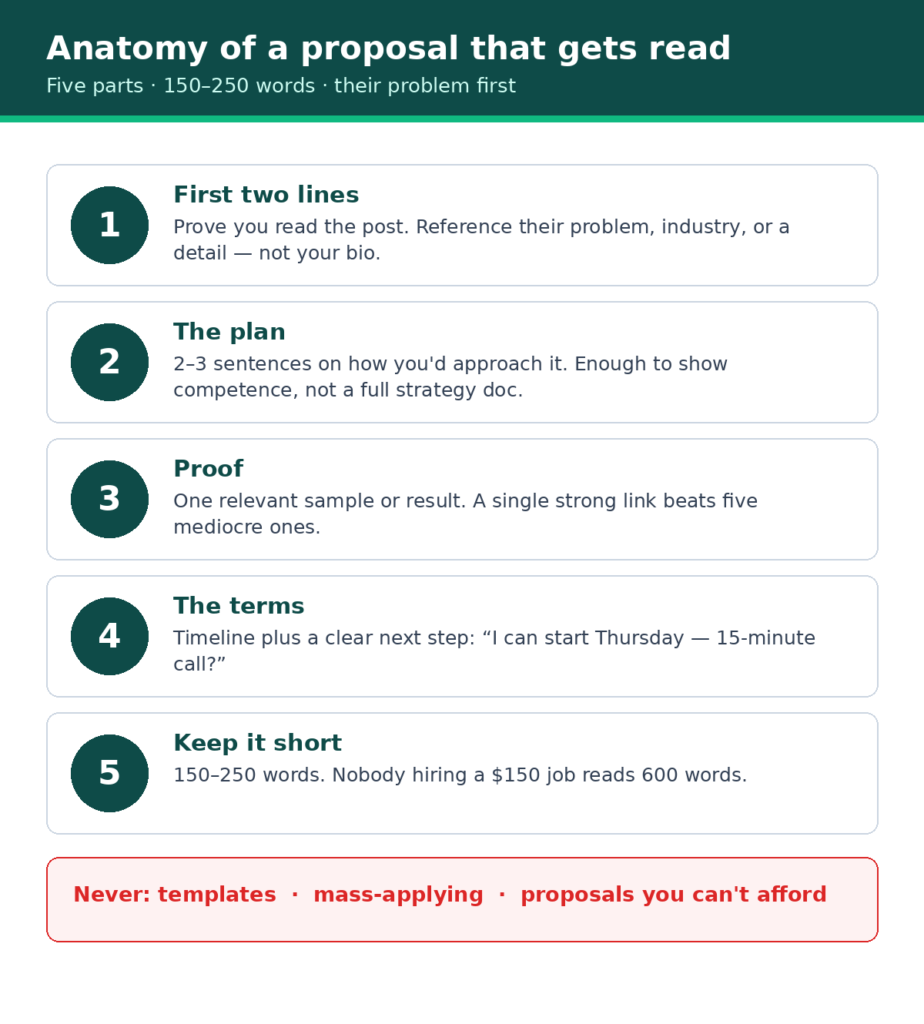
The anatomy of a proposal that gets replies
1. First two lines: prove you read the post. Reference something specific — their industry, a detail from the description, the actual problem. (“Your Shopify store sells handmade leather goods — your product descriptions read like spec sheets, which is exactly why browsers aren’t converting.”)
2. The plan: 2–3 sentences on how you’d approach it. Not a full strategy document — enough to show competence. (“I’d rewrite your top 10 product pages around buyer objections — starting with your bestsellers — and deliver the first three within 48 hours so you can see the style before committing.”)
3. Proof: one relevant result or sample. Link the single most relevant portfolio piece. One strong link beats five mediocre ones.
4. The terms: timeline and what happens next. (“I can start Thursday and deliver in 5 days. Happy to jump on a 15-minute call to discuss.”)
5. Keep it short. 150–250 words. Clients hiring for a $150 job won’t read 600 words.
A realistic proposal example (illustrative — all names, brands, and results below are fictional)
Subject context: a job post titled “Need product descriptions for 20 Shopify items — leather accessories brand”
“Your leather goods have strong reviews but thin product pages — that’s a conversion problem I can fix. I write product descriptions for ecommerce brands that sell on story and specifics, not spec sheets.
For your 20 items, I’d start with your 5 bestsellers so you can approve the voice before I write the rest — first batch in 3 days, full set in 10. Here’s a sample set I created for a fictional leather brand to show my style: [portfolio link].
I can start this week. Would a quick 15-minute call Thursday work to go over your brand voice?”
Why this works: the first line diagnoses their problem, the plan is concrete and de-risked (approve the voice first), the proof is one relevant link, and it ends with a low-friction next step. Note the sample is self-created and labeled as such — as a beginner, your portfolio pieces don’t need to be paid client work, but they must never be presented as client work they aren’t. Adapt the structure to your lane — don’t copy the words.
Proposal rules that protect your budget
- Never use templates. Clients can smell them, and Upwork’s own guidance favors tailored proposals. One thoughtful proposal beats ten templated ones.
- Budget Connects per proposal. Decide in advance what a proposal is worth to you (say, ≤8 Connects for most jobs) and skip posts that exceed it.
- Track what you send. A simple spreadsheet — job, Connects spent, date, reply or not — turns guessing into data within a month.
- Don’t chase every job. If you’re sending 10 proposals a day, you’re not being selective enough. Five careful proposals beat fifteen careless ones.
Step 4: Win the interview, then the contract

A reply to your proposal usually means a short interview — typically Upwork messages or a video call. This is where beginners either close or fumble.
Interview preparation
- Re-read the job post and your proposal before the call. Know what you promised.
- Prepare 3–5 questions about their goals, timeline, and what success looks like. Asking good questions signals professionalism more than having all the answers.
- Don’t discount on the call. If they push on price, point to scope: “I can do the 10 bestsellers for that budget, and we can add the rest as a second milestone.” Discounting teaches the client your rates are fictional.
- Take notes and confirm scope in writing on Upwork messages after the call. Misunderstandings are cheapest to fix before the contract starts.
Starting the contract right
Keep the first contract small and precisely defined — one milestone, clear deliverables, a short timeline. This limits everyone’s risk and gets you to a completed contract faster — the prerequisite for any review.
Fixed-price contracts: understand escrow and Fixed-Price Protection. On fixed-price work, the client funds each milestone into Upwork’s escrow — the money is set aside before work begins, and released when the client approves your work or the review period ends. Practical rules: don’t start milestone work until you see the “Funded” label next to it — Upwork states plainly that if a milestone isn’t funded in advance, it can’t help recover payment later.
Upwork’s Fixed-Price Protection applies when three conditions hold: the milestone was fully funded before you began, you delivered through the “Submit Work for Payment” button, and the submitted work matches the milestone description. If those hold and a dispute arises, Upwork steps in to facilitate a resolution — but in Upwork’s own words, payment isn’t guaranteed in every case (Upwork’s Fixed-Price Protection page). Define each milestone’s deliverable in writing, because work that doesn’t match the agreed scope falls outside the protection.
Hourly contracts: understand payment protection. Upwork’s Hourly Payment Protection covers you only if all of these hold: an active hourly contract, your completed identity verification, the client’s verified payment method, your account in good standing, hours tracked with the Upwork desktop app (manual time entries aren’t covered), a detailed work diary with memos and activity labels for each segment, and steady activity within the contract’s weekly hour limit. It doesn’t cover manual entries, idle time, hours over the weekly limit, or segments without memos. Meeting these requirements qualifies you for the program — it doesn’t guarantee how any individual dispute is decided. Treat the checklist as mandatory, not optional.
Which to choose first? For a first contract, fixed-price with a single funded milestone is usually simpler: defined deliverable, defined payment, faster path to a completed contract — and, if the client chooses to leave one, a first review. Reviews are voluntary: clients are never obligated to leave one, and a five-star outcome is never guaranteed. Your job is to earn the chance, not the stars.
Step 5: Deliver like your reputation depends on it (it does)
Your first few contracts shape your Upwork future more than anything else: a new profile with several strong early reviews reads very differently to clients than one with none, and your Job Success Score begins to take shape as you complete more contracts.
- Deliver early or exactly on time. Early delivery on a first contract is the cheapest reputation investment on the platform.
- Over-communicate. A brief progress note midway (“first batch done, on track for Friday”) prevents the silence that makes clients nervous.
- Ask for feedback the right way. When the work is approved: “If you’re happy with the result, a review would mean a lot as I’m building my Upwork history.” Don’t beg, don’t offer discounts for reviews — and don’t treat a missing review as a failure. Clients are never obligated to leave one; no review is a normal outcome, especially on small first contracts.
- Handle revisions gracefully — within scope. The revision limit in your proposal exists for this moment. Deliver the agreed revisions cheerfully; charge for anything beyond scope.
Watch out: the scams targeting new Upwork freelancers
New freelancers are scam targets precisely because they’re eager and unfamiliar with the platform’s norms. Learn these patterns before you need them:
- Off-platform contact requests. A “client” who immediately asks to move to Telegram, WhatsApp, or email — especially before any contract exists — is the single most common scam setup. Upwork’s terms require keeping communication and payment on the platform until a contract is in place. Legitimate clients don’t need your Telegram handle in the first message.
- Fake verification or training fees. No legitimate client asks you to pay a “verification fee,” buy “training materials,” or purchase equipment to start a job. Money flows from client to freelancer, never the reverse.
- “Pay to apply” schemes. Real Upwork jobs never charge you to be considered beyond the standard Connects cost shown on the post itself.
- Overpayment / check-cashing setups. A client “accidentally” overpays and asks you to refund the difference or forward funds elsewhere. This is check fraud with you as the middleman. End the conversation.
- Vague jobs with urgent tones and no verified payment method. Individually these are yellow flags; together they’re a pattern. The winnable-job checklist in Step 2 exists partly to filter these out.
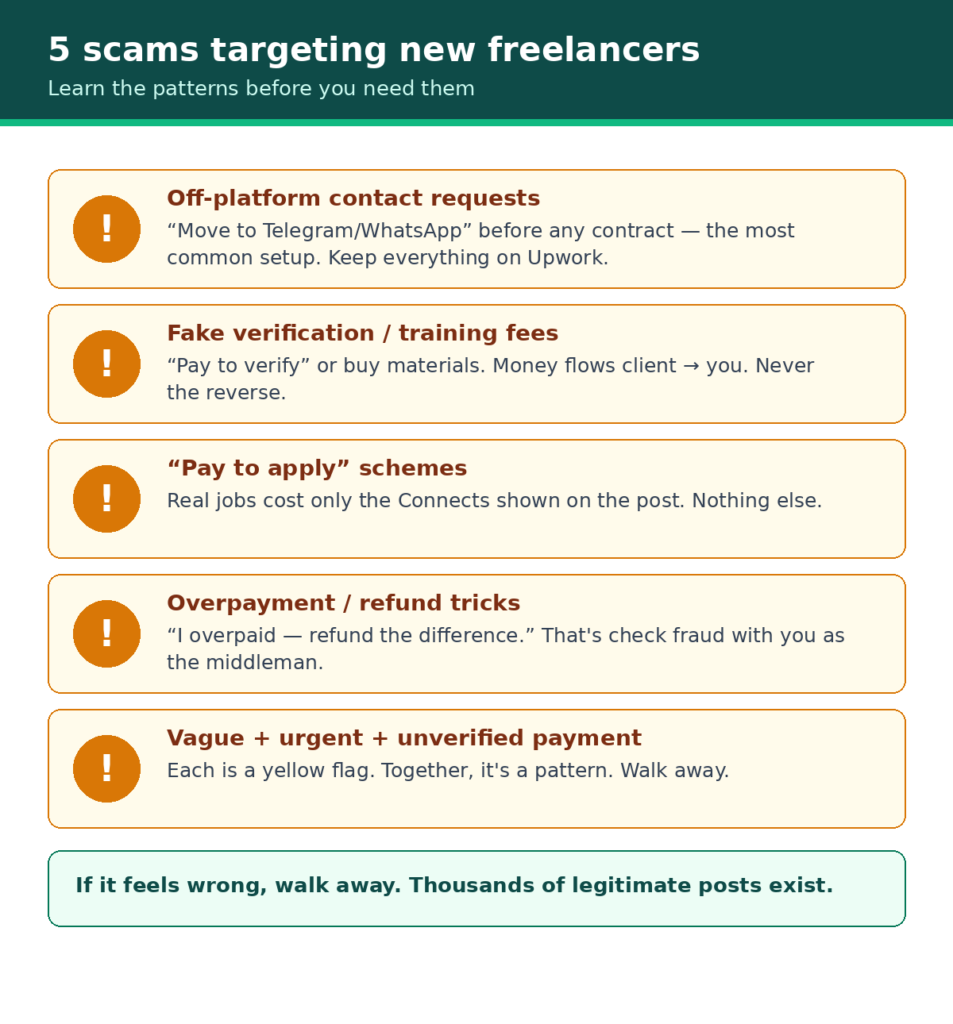
If something feels wrong, it probably is. Walk away — there are thousands of legitimate posts, and one scam can cost you more than a month of careful proposing earns.
Your first 30 days: an action plan (illustrative)
This is a sample plan, not a prescription — adjust the numbers to your schedule and budget. The structure is what matters: setup, then selective proposing, then delivery.
Days 1–3: Setup
- Create your account and complete identity verification
- Build the profile per the Step 1 checklist (one lane, real samples, honest details)
- Set your rate using the pricing math (floor rate → gross-up method)
- Add a verified billing method so you can purchase Connects if needed
Days 4–10: First proposals
- Send 2–3 selective proposals per day using the winnable-job checklist
- Track every proposal in a spreadsheet (job, Connects spent, reply or not)
- Budget cap: decide your total Connects spend for the month in advance
Days 11–20: Follow up and refine
- Review your spreadsheet: which proposals got replies? What did they have in common?
- Refine your proposal template-structure (not a copy-paste template) based on what worked
- Keep proposing; don’t pause to wait for replies
Days 21–30: Close and deliver
- Interview promptly when replies come; keep the first contract small and defined
- Deliver early, communicate well, and — if the client chooses to leave one — request the review professionally
- Reassess: if nothing has converted, the data in your spreadsheet tells you whether the problem is volume, targeting, or the proposals themselves
If the first month produces no client — a realistic possibility, not a verdict on you or the platform. Work through this review in order:
1. Targeting: did your proposals actually pass the winnable-job checklist, or did most go to posts with 50+ proposals and unverified payment methods?
2. Proposals: read your sent proposals aloud — do the first two lines reference the specific job, or could they fit any post?
3. Profile: is your title specific, are your samples your strongest work, is your rate grounded in the pricing math?
4. Spend: did you stay within your budget cap, and what does the spreadsheet say about which jobs got replies?
Change one thing at a time — narrow your lane further, rewrite your overview’s first two lines, replace your weakest sample, or lower your Connects ceiling per proposal. Give each change two weeks of data before judging it. If a second month of selective proposing still yields nothing, consider whether a different channel fits better: direct outreach, or Fiverr’s listing-based model where buyers come to you. The comparison guide can help you decide — persistence on the wrong channel is just expensive.
US tax basics for Upwork freelancers (read this before you spend it)
In the US, Upwork work generally makes you an independent contractor, not an employee — but the exact tax consequences depend on your situation:
- Self-employment tax (~15.3%) generally applies to net freelance earnings above $400 for the year, on top of income tax — nobody withholds it for you.
- Quarterly estimated payments (typically April, June, September, January) may be required depending on how much tax you’ll owe — the IRS sets thresholds and safe-harbor rules, so this isn’t automatic for everyone.
- Track everything from day one: income, Connects purchases, the service fee on each contract, software, home-office costs. Upwork provides earnings reports and issues tax documentation where required; keep your own records too.
- This isn’t tax advice — consider a tax professional in your first year, especially once income becomes regular.
Frequently asked questions
Can I get clients on Upwork with no experience?
Yes, but “no experience” needs a qualifier: you need no Upwork history, but you do need a demonstrable skill with samples. Clients hire capability, not platform tenure. Build 2–3 strong portfolio samples in your lane before proposing — they substitute for the work history you don’t have yet. Target small, well-defined jobs where the risk to the client is low.
How many proposals does it take to get the first client?
There’s no reliable number — anyone quoting one is guessing. What matters more than volume is selectivity and tracking: send careful proposals to winnable jobs, record the results, and improve what isn’t working. Beginners who mass-apply typically burn Connects without learning anything; beginners who track 20 careful proposals know exactly what to fix.
How much does it cost to start on Upwork?
The account is free. Your real startup costs are Connects (budget roughly $15–$30 for a first month of selective proposing, less if free monthly Connects arrive) plus the service fee (0–15%) deducted from earnings later. Don’t pay for Freelancer Plus ($19.99/month) until the features beyond the Connects themselves are worth the roughly $5/month premium to you.
Should I start on Upwork or Fiverr?
It depends on how you like to find work: Upwork is proposal-based (you apply to posted jobs, paying Connects per application); Fiverr is listing-based (you post gigs and buyers come to you, with a flat 20% commission). If you’re unsure, our Fiverr vs Upwork comparison for beginners breaks down which fits which situation.
What should I charge as a beginner on Upwork?
Run the pricing math before you set your profile rate: calculate your floor rate, gross it up for the service fee and taxes, and sanity-check it against your lane. Our freelance pricing guide works the full calculation with Upwork’s fee structure — including what a $50/hour rate actually pays after fees and taxes.
How do I avoid scams on Upwork?
Keep communication and payment on Upwork until a contract exists, never pay a client or “verifier” anything, only apply to posts showing the standard Connects cost, and prefer clients with verified payment methods. The scam patterns in the section above cover the most common setups — when in doubt, walk away.
Platform policies verified against official Upwork documentation, October 2026. Upwork changes fees, Connects pricing, and badge programs — if a number here differs from the official page, the official page wins. Next freshness review: April 2027.