

You’ve probably heard the old advice: “Look for typos and bad grammar — that’s how you spot a scam job posting.” That advice is dead. Scammers now use the same writing tools everyone else does, and their postings read cleanly and professionally. What still works is checking the structure of the opportunity — how money flows, and what they ask for, and when. Those differences show up long before anyone asks you to deposit a check.
This guide covers the whole job-scam family — not only remote and work-from-home scams, although those are the lead context here. The same patterns appear in data entry, customer service, administrative, warehouse, and part-time work, and in messages that arrive when you were not job hunting at all.
According to the Federal Trade Commission (FTC), “the number of reports tripled from 2020 to 2024, and the amount consumers reported losing to these scams jumped from $90 million to $501 million” for job and employment agency scams (FTC press release, March 2025). Those are reported losses — the Better Business Bureau (BBB) notes in its May 2026 study that the study cites a 4.8% reporting rate based on FTC data, so reported figures are likely a vast undercount.
How can I tell if a job is a scam?
You can usually tell a job is a scam if you are asked to pay, deposit a check, or share bank or Social Security details before a real interview and written offer, especially after an unexpected text, vague duties, unusually high pay, and pressure to act immediately.
Keep one rule of thumb in front of every offer: an employer pays you — you never pay, deposit, or forward money to get a job. If an opportunity breaks that pattern, treat it as a red flag and stop to verify independently. Below: how the main scams work, the red flags, a staged protocol for when money or data changes hands, and what to do if you already paid.
How job scams reach you now
Fake postings on real boards
Scammers copy or invent postings on major job boards, using a real company’s name and a copied description while the application link or “recruiter” behind it leads to the scammer. Being listed on a legitimate platform does not mean the employer verified it — cross-check the role on the company’s own careers page, reached by typing its address yourself.
Fake-recruiter texts, WhatsApp, and Telegram messages
A growing share start with a message, not a posting. The BBB’s May 2026 study found that in 2025, half of the over 23,000 employment-scam reports to BBB Scam Tracker listed text messages as the delivery method; nearly 50,000 people reported an employment scam over the study’s three years, with reports doubling in 2025 (BBB, “Employment Scams 2026 Update,” bbb.org).
The FTC describes a common version this way: “They’ll often mention pay (sometimes daily or weekly rates) without any details on the actual job,” and instead of asking you to click a link, scammers may ask you to reply with “YES” or “INTERESTED” — a small step that moves you to WhatsApp or Telegram (FTC Consumer Advice, “That job offer text is probably a scam,” April 2026). The FTC warns: “Ignore generic and unexpected texts, WhatsApp, or Telegram messages about jobs. Real employers will never contact you that way” (FTC Consumer Advice, “How to spot and avoid task scams,” August 2025). That is about generic and unexpected contact — employers you actually applied to may legitimately text about interviews.
Lookalike sites, domains, and recruiter impersonation
Scammers build credibility with lookalike websites, misspelled domains, copied careers pages, and fake profiles borrowing a real recruiter’s name and photo. The FTC notes that a recruiter using a personal email domain — such as @gmail.com or @yahoo.com — rather than a corporate account is a tell, along with pushing for personal information before answering questions about the job (FTC Consumer Advice, “Job scammers are looking to hire you,” July 2025). Verify the channel: does the message come from the real domain, does the role exist on the company’s own careers page, and can the company confirm this person is hiring for it?
The main types of job scams
Most job scams are variations on a few mechanisms. The pitch changes — data entry this week, “product boosting” next week — while the mechanism stays the same.
Task scams (gamified job scams)
The FTC defines task scams this way: “Task scams — or gamified job scams — begin with an unexpected message offering you ‘work’ doing things like ‘optimization’ or ‘product boosting’ online,” with contact arriving through WhatsApp, Telegram, text, or social media (FTC Consumer Advice, “How to spot and avoid task scams,” August 2025).
How the trap works:
- The hook. An unexpected message offers simple tasks — liking videos, rating products, “boosting” listings — for commission.
- The trust payment. You complete a few tasks in a scammer-controlled app, and “they might pay you a little — usually $5 to $20 — to try to gain your trust.”
- The deposit demand. To unlock the next set or release supposed earnings, you must deposit your own money, usually in crypto. The FTC’s December 2024 Data Spotlight notes: “Tasks are often assigned in sets of forty,” and scammers “say you have to make a deposit to complete your next set of tasks and get your supposed earnings out of the app.”
- The pressure. If you hesitate, the Spotlight notes, “scammers will often invite you to a group chat where newcomers hear supposed success stories from (fake) experienced workers.”
- The squeeze. Each deposit creates a reason another is needed. The app balance is not real money you can withdraw; when you stop paying, the account and your money disappear.
The FTC estimated about 20,000 task-scam reports in the first half of 2024, compared to about 5,000 in all of 2023 — estimates based on hand-coding a random sample of 500 job-scam reports for each year (FTC Data Spotlight, December 12, 2024). In that estimate, task scams were 38.8% of job-scam reports in H1 2024, up from 5.6% in 2023. The BBB adds that nearly 680 employment scams reported to BBB in 2025 appear to be task-based, with median task losses hitting $2,300 in 2025 (BBB, “Employment Scams 2026 Update,” bbb.org). The Spotlight also reports about $41 million lost to job scams using cryptocurrency in H1 2024, versus about $21 million in all of 2023, and that people now report losing far more via cryptocurrency than any other payment method.
The FTC’s three rules: ignore generic, unexpected job messages on text, WhatsApp, or Telegram; “Never pay anyone to get paid, or to get a job. That’s a sure sign of a scam”; and “Don’t trust anyone who says they’ll pay you to give a positive rating or like things online. No honest company will do that” (FTC Consumer Advice, “How to spot and avoid task scams,” August 2025). A small first payment does not prove a platform is real — it is a stage of the scam.
Fake-check and equipment scams
After a fast “hire,” the company sends a check — often for more than the stated cost — and tells you to deposit it, buy equipment from an “approved vendor,” and return the difference. The check is fake: your bank may make funds available before it is discovered, you send real money to the scammer’s “vendor,” and when the check bounces the bank takes the full amount back from your account.
The FTC states the rule directly: “Never bank on a ‘cleared’ check. No honest potential employer will ever send you a check and then tell you to send on part of the money, or to buy gift cards with it. That’s a fake check scam. The check will bounce, and the bank will want you to repay the money” (FTC Consumer Advice, “How to avoid work-from-home job scams,” June 2025). And: “It can take weeks for a bank to discover that a check it cleared was a fake” (FTC Consumer Advice, “Refund and Recovery Scams”). Legitimate employers generally ship equipment directly or reimburse through payroll.
Reshipping and money-mule “jobs”
Some “jobs” ask you to receive and reship packages, receive and forward money, or buy and send gift cards. The FTC names reshipping packages as a gig pattern scammers offer, alongside data entry and other work from home (FTC Consumer Advice, “How to avoid a side hustle scam,” February 2026). Taking one of these jobs can draw you into moving stolen money or goods without intending to. Do not reship or forward anything for an unverified employer; if you already have, preserve the instructions and start with the playbook below.
Upfront-fee scams
The oldest version: pay for training, a certification, a background check, or a starter kit first. The FTC describes work-from-home pitches promising thousands a month with little effort, where the money ends up “paying for starter kits, so-called training, or certifications that are useless” (FTC Consumer Advice, “How to avoid work-from-home job scams,” June 2025). Consumer.gov states the sign in one line: “Scammers promise you a job but ask you to pay first.” One distinction: some legitimate freelance marketplaces charge a platform fee (such as bid credits) on a platform you chose to join — unlike an “employer” who contacted you asking to be paid to hire you.
Identity-harvest “onboarding”
Some fake jobs take your identity instead of money. Before a real interview or written offer — sometimes in the first conversation — you are asked for your Social Security number, driver’s license photo, or bank details for “direct deposit.” The FTC describes a fake recruiter who pushes for that information before answering questions about the job, notes that real employers will not ask for it before they have actually interviewed and hired you, and specifically names those requests before any discussion of job duties as a warning sign (FTC Consumer Advice, “Job scammers are looking to hire you,” July 2025). Legitimate employers generally ask for tax and banking information only after a formal offer, and collect it through a secure HR portal — not by text or chat.
For category-specific checks, see the scam filter in our legitimate remote data entry jobs guide and the verification section in our work-from-home customer service jobs guide.
When a “job” turns into an investment pitch
The last type starts as work and ends as investing: a “recruiter” or job group chat introduces a mentor, trading system, or crypto opportunity, fellow “workers” post supposed profits, and you are urged to move from small commissions to larger deposits. Treat any move from a job conversation to an investment deposit as the end of the job conversation — legitimate employers generally do not recruit workers into investment programs through a job chat, so treat the pitch itself as a red flag rather than a hiring step. This crossover is described as a pattern only; the protection is the same as for task scams: never deposit to unlock earnings.
The scam crossover map
These types are branches of one system — exit at the first branch, not the last.
| Where it starts | Where it moves | The moment to exit |
|---|---|---|
| Fake posting or recruiter text | Fake-check equipment scam | You are sent a check and told to buy from a vendor or return a difference |
| Recruiter text or social message | Task scam, then a crypto deposit | You are paid a little, then told to deposit to unlock the next set of tasks |
| “Package handling” or reshipping offer | Moving stolen goods or money | You are asked to receive and forward packages or funds you did not buy or earn |
| Job or task group chat | Investment pitch | A “mentor” or fellow “worker” urges you to deposit into trading or crypto |
| Any job scam where you paid or shared data | Recovery scam | A stranger offers to recover your money for an upfront fee (see the playbook) |
Every row shares the same tells: money or data requested before trust is earned, a move to a private messaging app, and urgency replacing documentation.
The red flags: a fast diagnostic
Use this list for one specific offer, right now. Several flags together — especially with pressure to move fast — are a strong reason to stop and verify.
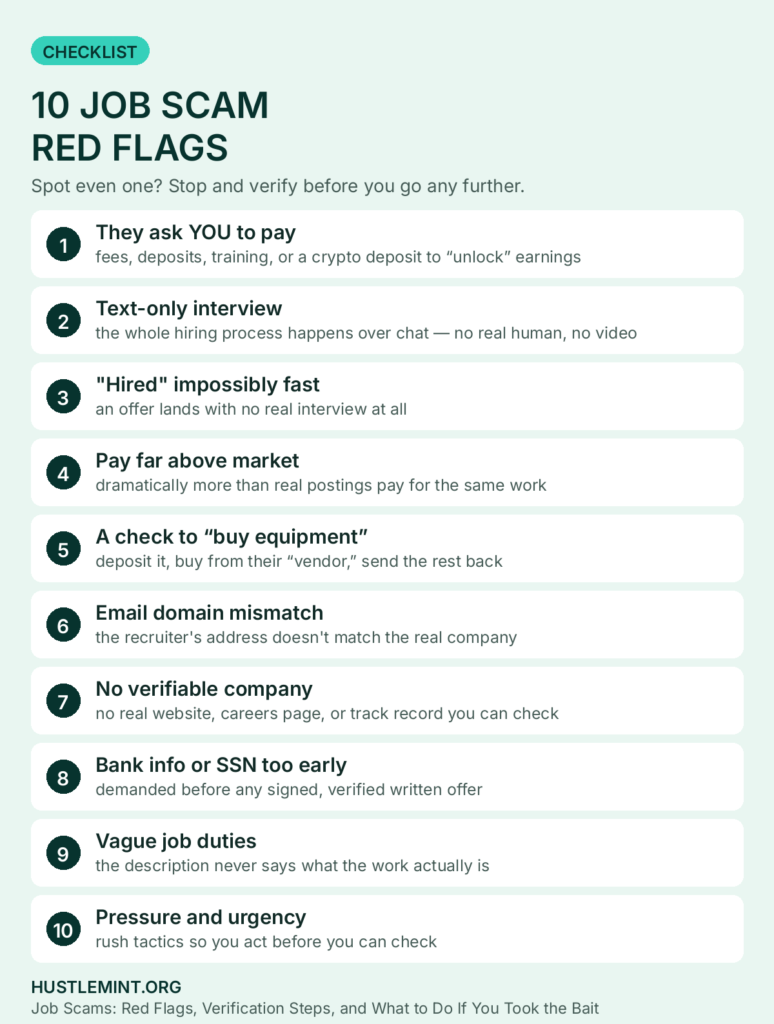
Red Flag #1: They ask YOU to pay
The red flag. Any “job” requiring you to pay to get hired — equipment fees, training deposits, background-check payments, starter-kit costs — is a major red flag. The FTC: “Never pay anyone to get a job. Anyone who asks you to pay to get a job is a scammer” (FTC Consumer Advice, “Job-seeking servicemembers: Avoid scams while you search,” June 2025).
Why scammers do this. There is no job — the fee is the product: a deposit for a laptop that never ships, a worthless paid “certification,” or a background-check payment sent to the scammer’s “partner.”
What to do instead. Most legitimate employers absorb hiring costs. Verify the company independently — search its name plus “scam,” check its careers page, call a publicly listed number — and pay nothing meanwhile.
Red Flag #2: The interview happens entirely over text
The red flag. The whole process takes place over WhatsApp, Telegram, or text — no video or phone call, just chat from a “hiring manager.”
Why scammers do this. Voice and video create risk — a call can expose a recruiter who matches no real employee — while text lets one person run hundreds of conversations at once. The BBB lists interviewers who refuse a camera among its flags (BBB, “Employment Scams 2026 Update,” bbb.org).
What to do instead. Most legitimate remote employers interview by video or phone — ask for a brief call through official channels. See our non-phone work-from-home jobs guide for what real hiring looks like.
Red Flag #3: You’re “hired” impossibly fast
The red flag. Within hours — sometimes minutes — of applying or replying, you have the job. No real interview, reference checks, or skills assessment. The BBB study lists high-pressure, immediate offers among its flags for the same reason.
Why scammers do this. Speed is the point — time to think is time to research the company or talk to a friend. A fast “offer” creates excitement that overrides skepticism.
What to do instead. Real hiring usually takes days and some evaluation, even for entry-level roles. Check the company’s real careers page and search its name plus “reviews” and “scam.” If it barely exists outside the recruiter’s messages, that is your answer.
Red Flag #4: The pay is dramatically above market
The red flag. A data entry position at $45 an hour, a “package handler” role at $8,000 a month, or part-time chat support at $35 an hour, no experience required — illustrative examples of scam bait, not market data.
Why scammers do this. Inflated pay is bait that makes you overlook other flags — and justifies the next step (“of course we need an equipment deposit — look how much we pay”). Scammers set pay well above real market ranges; the FTC describes the pattern as promising big money for little effort (consumer.gov, “Job Scams Explained”; FTC Consumer Advice, “How to avoid a side hustle scam,” February 2026).
What to do instead. Check Bureau of Labor Statistics (BLS) wage data for the role: pay well above the BLS range for the role, with no experience required, is a strong red flag. For realistic ranges, see our legitimate remote data entry jobs and work-from-home customer service jobs guides.
Red Flag #5: They send you a check to “buy equipment”
The red flag. After you are “hired,” a check arrives — often for more than the equipment costs — with instructions to deposit it, buy from an “approved vendor,” and return the difference.
Why scammers do this. Funds may be made available before a fake check is discovered. You send real money to the scammer’s “vendor”; when the check bounces, the bank takes the full amount back from your account.
What to do instead. Never deposit a check from an unverified employer or send money back from one. If you already deposited one, contact your bank immediately and do not spend the funds — discovery can take weeks, not days (FTC, above). Legitimate employers generally ship equipment directly or reimburse through payroll.
Red Flag #6: The email domain doesn’t match the company
The red flag. A “recruiter” for an established corporation writes from a Gmail, Yahoo, or Outlook address, a slight misspelling of the real domain, or a domain registered last week.
Why scammers do this. They do not work for the company, so they cannot use its domain. Free accounts are disposable; misspelled domains fool a quick glance.
What to do instead. Check the full address, not just the display name. Type the company’s address yourself, check its careers page, and call its publicly listed number for the recruiter. Small businesses and staffing agencies are real exceptions — but for a company with a careers page, a free email address is a significant flag.
Red Flag #7: The company has no verifiable presence
The red flag. You search and find nothing: no LinkedIn page, no real website (or one created last month), no reviews, no registration. The company exists only in the posting and the recruiter’s messages — because it does not exist.
What to do instead. Search “[company name] + scam” and “+ reviews,” check LinkedIn and BBB Scam Tracker. The FTC advises: “Do some research. Search online for the name of the company and words like ‘review,’ ‘scam,’ or ‘complaint.’ If you can’t find the company online, steer clear” (FTC Consumer Advice, “Job-seeking servicemembers: Avoid scams while you search,” June 2025).
Red Flag #8: They want your bank info or SSN before you’ve signed anything
The red flag. Before a formal offer — sometimes in the first conversation — they ask for bank details, your Social Security number, or a driver’s license photo.
Why scammers do this. They are harvesting identity: bank numbers can enable unauthorized withdrawals, and Social Security numbers can enable credit accounts or fraudulent tax returns in your name.
What to do instead. Most legitimate employers collect this after a formal offer, through secure HR portals. Never send ID or banking photos by email or messaging app; verify any early request through the company’s official HR contact, found on its real website.
Red Flag #9: The job description is vague about actual duties
The red flag. The posting promises “work from home,” “flexible hours,” and “great pay,” but the duties are generic — “handle various tasks,” “assist with operations” — and you still cannot describe the job to a friend.
Why scammers do this. Specificity creates questions they cannot answer; vagueness lets one template target everyone. The FTC has flagged this pattern: fake recruiters mention pay “without any details on the actual job” (FTC Consumer Advice, “That job offer text is probably a scam,” April 2026).
What to do instead. Look for specific tools, concrete tasks, a reporting structure, and measurable expectations — as in the real postings described in our non-phone work-from-home jobs guide.
Red Flag #10: Pressure tactics and artificial urgency
The red flag. “This position fills today.” “We need your decision by tonight.” “This offer expires in 2 hours.” The FTC’s side-hustle guidance names “Scammers pressure you” among its core signs (FTC Consumer Advice, “How to avoid a side hustle scam,” February 2026).
Why scammers do this. Urgency is the enemy of verification. The FTC warns: “Scammers try to pressure you to act quickly so you don’t have time to think” (FTC Consumer Advice, “Job-seeking servicemembers: Avoid scams while you search,” June 2025).
What to do instead. Slow down deliberately — most legitimate employers will not rescind an offer because you took a day to think — and tell a friend or family member first. As the FTC puts it: “Slow down and talk to someone you trust” (same FTC page).
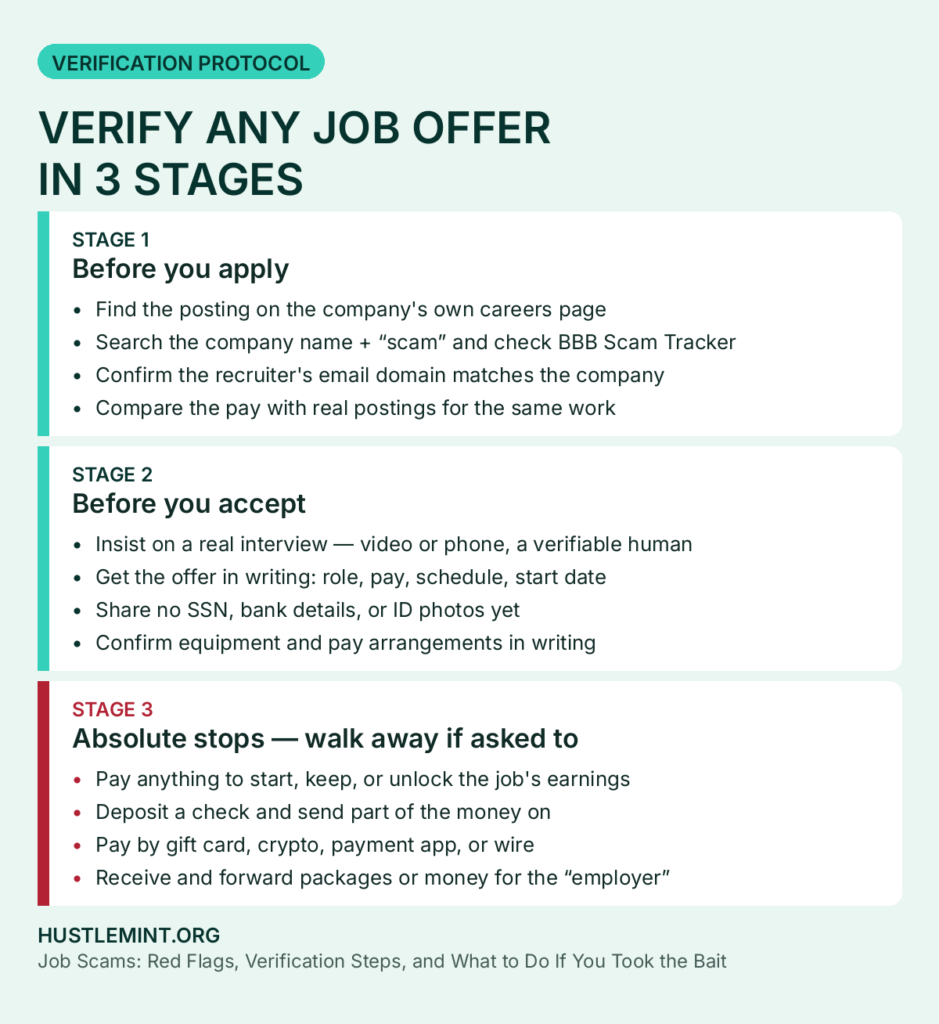
The verification protocol: three stages
This protocol is staged around the three moments when risk changes. You do not need the later stages if an offer fails an earlier one.
Stage 1: Before you apply
- Find the posting on the company’s own careers page. Type the address yourself; if the role is not listed, ask the company — via its publicly listed number or form — whether the role and recruiter are real.
- Search the company name plus “scam,” “review,” and “complaint” — the FTC’s own research step. If you cannot find the company online at all, steer clear.
- Check BBB Scam Tracker at BBB.org/ScamTracker. The BBB study’s first tip is the same: research the company before you apply.
- Confirm the recruiter’s domain matches the company (Red Flag #6).
- Compare pay and duties with reality — the BLS range and real postings. Vague duties plus pay far above market: walk away.
Stage 2: Before you accept
- Insist on a real interview with a verifiable human — video or phone, through official channels (the BBB advises video as a verification step). Text-only hiring is a stop sign.
- Get the offer in writing — role, pay, schedule, start date, and manager, in a document, not only in chat.
- Share no personal or financial documents yet — no Social Security number, bank details, or ID photos before a confirmed written offer and secure portal.
- Talk to someone you trust before accepting — a formal step in FTC and consumer.gov guidance, not just common sense.
- Confirm equipment and pay in writing. Any answer involving a check to deposit or money to forward belongs in Stage 3 — as a stop.
Stage 3: Before you pay or share anything — the absolute stops
No verification workaround exists for this stage. If any of the following appears, end the process:
- Any payment to get, start, or keep the job, or to unlock earnings — fees, deposits, training, certification, background checks, starter kits, or a task-platform crypto deposit.
- Any instruction to deposit a check and send on part of the money, buy gift cards with it, or pay an “approved vendor” from it.
- Any hiring-related request to pay by gift card, cryptocurrency, payment app, or wire. Consumer.gov warns that paying these ways is like using cash (consumer.gov, “Job Scams Explained”).
- Any instruction to receive and forward packages or money for the “employer.”
- Any demand for your Social Security number or bank details before a verified written offer.
If the person you are talking to says your case is the exception, that claim itself is the scam’s final stage.
What legitimate remote hiring usually looks like
Practices vary, but most legitimate remote employers:
- Post the role on their own careers page as well as job boards, and the postings match.
- Use company email addresses for recruiters, who have verifiable professional profiles.
- Interview by video or phone, often in more than one round.
- Send formal written offers with salary, benefits, start date, and reporting structure.
- Collect background and tax documents through secure HR portals after you have signed an offer.
- Ship equipment directly or reimburse through payroll — not via surprise checks or vendors requiring transfers.
- Rarely rush you. A day or two to consider an offer is normal.
A deviation does not prove a scam, but it does mean verifying independently. Compare against our guides to non-phone work-from-home jobs, work-from-home customer service jobs, and legitimate remote data entry jobs.
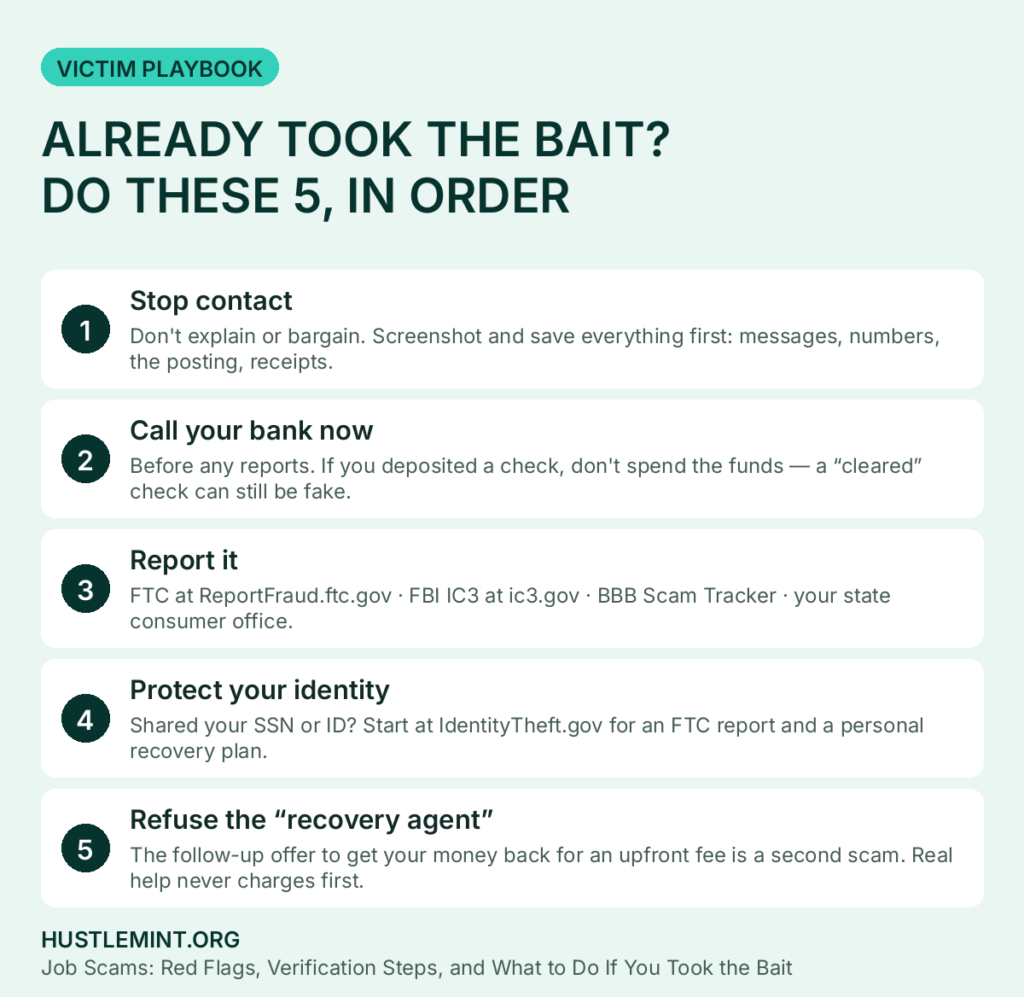
If you already engaged or paid: the victim playbook
Do not panic, and do not feel embarrassed — these are organized operations built to look like real hiring. What matters now is sequence and speed: the first hours are when a bank or payment company has the most chance to stop or recall a transfer.
Step 1: Stop contact and preserve evidence
Stop all communication — do not explain or bargain for your money back. Further contact gives the scammer more chances to extract money or data, including through the recovery scam in Step 5.
Before blocking anything, preserve evidence: screenshots, numbers, usernames, email and website addresses, the posting, check images, receipts, wallet addresses, and instructions. The FBI’s Internet Crime Complaint Center (IC3) asks for identifying information about the person or company, methods of communication (websites, emails, fake social profile names, telephone numbers), financial transaction information (dates, payment types, amounts, account numbers, receiving institutions or cryptocurrency addresses), and a description of the interaction and how payment was instructed (FBI IC3 Public Service Announcements, 2025–2026).
Step 2: Call your bank now
If money or a check is involved, your bank is the first call — before the reports.
- If you deposited a check: tell the bank immediately, do not spend any of the funds, and ask what your liability is if it is returned. Remember: it can take weeks for a bank to discover a cleared check was fake, and the bank will want repayment of money you sent on from it (FTC).
- If you sent money: contact the company you used right away — bank, wire service, payment app, or gift-card/crypto company — and ask whether it can be stopped or reversed and what the deadline is. Consumer.gov gives the same instruction: “Contact the company you used to send the money right away” (consumer.gov, “Job Scams Explained”). Some recall windows are measured in hours.
- Secure your accounts: ask about closing or monitoring any account the scammer has details for, and change logins, passwords, and PINs.
Be accurate with the bank about how the payment happened — that is what lets it act.
Step 3: Report it — five places
Reporting does not guarantee your money back, but it builds the cases and warnings that stop the next round:
- The FTC at ReportFraud.ftc.gov, or by phone at 1-877-382-4357 (consumer.gov, “Job Scams Explained”).
- The FBI’s IC3 at ic3.gov — type the address yourself. The FBI warns that fake IC3 sites exist, including spoofed sites in “sponsored” search results, and that a real IC3 address ends in .gov (FBI IC3 PSA, July 2026). This matters most for internet-enabled scams, larger losses, and crypto deposits.
- BBB Scam Tracker at BBB.org/ScamTracker — other job seekers search it at Stage 1 above.
- The job board or platform where you found the posting or message, so it can remove them.
- Your state consumer protection office — via the official directory at usa.gov/state-consumer, linked from IdentityTheft.gov.
Step 4: If you shared personal information
If you gave a scammer your Social Security number, ID, or bank details, treat this as possible identity theft too:
- Go to IdentityTheft.gov. Entering what happened creates your FTC Identity Theft Report and a personalized recovery plan; the report “proves to businesses that someone stole your identity” and the site pre-fills forms and letters (IdentityTheft.gov, “Steps”).
- Make the fraud-department calls the plan directs: “Call the fraud department. Explain that someone stole your identity. Ask them to close or freeze the accounts… Change logins, passwords and PINS for your accounts.”
- Place a fraud alert or a credit freeze — different tools. A fraud alert is free; a business must verify your identity before issuing new credit in your name, and you can renew it after one year. A credit freeze limits access to your credit report until you lift it; it is free, available to anyone, and is set by contacting each bureau — TransUnion (888-909-8872), Experian (888-397-3742), Equifax (800-685-1111), as listed at IdentityTheft.gov. An extended alert for identity-theft victims lasts seven years and is set via one bureau, which must tell the other two, with your FTC Identity Theft Report.
- Monitor and lock. “You can check your reports every week for free at AnnualCreditReport.com” (IdentityTheft.gov, “Steps”), and IdentityTheft.gov notes: “Consider setting up an E-Verify account so you can lock your Social Security number.” If you are 60 or older, IC3 guidance also lists the DOJ Elder Justice Hotline at 1-833-FRAUD-11 (833-372-8311).
Step 5: Beware the second scam — fake recovery agents
Victims are targeted a second time. The FTC warns: “Don’t trust calls, letters, emails, texts, or messages on social media from someone who says they can recover money you lost in a scam for a fee,” and “Never pay upfront for a refund or help with a refund” (FTC Consumer Advice, “Refund and Recovery Scams”). Scammers trade lists of prior victims — the page calls it a “sucker list” — and government agencies “will never ask for money to help you get a refund.”
The FBI has warned about a version aimed at IC3 itself: between December 2023 and February 2025, it received more than 100 reports of IC3 impersonation scams, in which scammers “claimed to have recovered the victim’s lost funds or offered to assist in recovering funds. However, the claim is a ruse to revictimize those who have already lost money to scams” (FBI IC3 PSA, April 2025). The 2026 update adds AI-generated videos impersonating FBI leadership and spoofed IC3 websites, and states: “IC3 will never directly communicate with individuals via phone, email, social media, phone apps, online chat, or public forums,” “IC3 will never ask for payment to recover lost funds,” and “IC3 does not maintain a social media presence” (FBI IC3 PSA, July 2026).
Hold those as absolutes: no legitimate agency will contact you out of the blue, charge upfront to recover losses, or ask you to move to Telegram to “update” a report. If someone does, it is the second scam — stop contact, preserve the messages, and report it too.
Frequently asked questions
Is it a scam if they ask for my SSN for a background check?
Timing and channel decide it. Legitimate employers generally collect Social Security numbers after a written offer, through a secure HR portal. A request before any real interview, or by text, chat, or email, matches the FTC’s identity-harvest pattern, which specifically names those requests before a discussion of job duties (FTC Consumer Advice, “Job scammers are looking to hire you,” July 2025). Verify any early request through the company’s official HR contact, found on its real website.
I deposited the check and it “cleared” — am I safe?
No. The FTC is explicit: “Never bank on a ‘cleared’ check,” and “It can take weeks for a bank to discover that a check it cleared was a fake” (FTC Consumer Advice, June 2025, as cited above). Funds made available are not proof the check was good — do not spend or send on any of it, and call your bank now.
Can I get money back from a task scam?
There is no guaranteed route, and anyone who promises one for an upfront fee is running the recovery scam above. Act immediately: contact the company or bank you used about stopping or reversing the payment, preserve all payment and wallet details, and report to the FTC, IC3, and BBB Scam Tracker. For scale, the FTC reports about $41 million lost to job scams using cryptocurrency in the first half of 2024 alone (FTC Data Spotlight, December 2024) — a measure of the problem, not a recovery rate.
Do real recruiters text you?
They can — if you applied or opted in, a text about an interview can be legitimate. What the FTC warns against is narrower: “generic and unexpected texts, WhatsApp, or Telegram messages about jobs,” mentioning pay “without any details on the actual job” and asking you to reply “YES” or “INTERESTED” (FTC Consumer Advice, August 2025 and April 2026, as cited above). An unsolicited high-pay message from a company you never applied to is the pattern to ignore.
I did tasks and got paid a little — doesn’t that prove it’s real?
No. According to the FTC, that payment is a stage of the scam: task scammers pay “usually $5 to $20 — to try to gain your trust” before demanding a deposit, usually in crypto, to release supposed earnings (FTC Consumer Advice, “How to spot and avoid task scams,” August 2025; FTC Data Spotlight, December 2024).
What if I shared my bank details but sent no money?
Still act. Call your bank’s fraud department, explain a suspected scammer obtained the details through a fake job offer, and follow its instructions on monitoring, closing, or replacing the account. Change logins, passwords, and PINs, as IdentityTheft.gov directs, and — if you also shared your Social Security number or ID — start the IdentityTheft.gov plan and consider a credit freeze. In this version of the scam, sharing the data is the harm, even when no payment was made.
The bottom line
Scammers have a hard time faking the structure of legitimate employment — the money flow, the verification process, the interview standards, the patience. Remember the money-flow test: in legitimate employment, money flows toward you, not away from you. If a “job” reverses that flow — a fee, a deposit, a check to forward, a package to reship, an investment to fund — stop and verify. Verify before you apply and again before you accept, pay and share nothing Stage 3 lists, and — if you already engaged — work the playbook in order: stop contact, call your bank, report it, protect your identity, and refuse the second scam when it arrives dressed as help.
Sources
- FTC, “New FTC Data Show a Big Jump in Reported Losses to Fraud to $12.5 Billion in 2024” (press release, March 2025) — job/employment-agency reports tripled 2020–2024; losses $90M to $501M. FTC press release (March 2025)
- FTC Data Spotlight, “Paying to get paid: gamified job scams drive record losses” (Dec 12, 2024) — task-scam estimates (about 20,000 in H1 2024 vs about 5,000 in 2023, from a hand-coded sample of 500 reports/year); 38.8% task share in H1 2024; over $220M job-scam losses in H1 2024; about $41M crypto losses. FTC Data Spotlight on task scams (PDF, Dec 2024)
- FTC Consumer Advice: “How to spot and avoid task scams” (Aug 2025); “That job offer text is probably a scam” (Apr 2026); “Job-seeking servicemembers: Avoid scams while you search” (Jun 2025); “Job scammers are looking to hire you” (Jul 2025); “How to avoid work-from-home job scams” (Jun 2025); “How to avoid a side hustle scam” (Feb 2026); “Refund and Recovery Scams” — all at consumer.ftc.gov.
- Consumer.gov (FTC companion), “Job Scams Explained.” Consumer.gov — Job Scams Explained
- FBI IC3 PSAs on IC3 impersonation and recovery scams (Apr 2025; Jul 2026). IC3 PSA (April 2025) and IC3 PSA (July 2026) — complaints at ic3.gov
- FTC, IdentityTheft.gov, “Steps.” IdentityTheft.gov — recovery steps — state directory: USA.gov state consumer directory
- BBB, “Employment Scams 2026 Update” (May 2026, bbb.org) — nearly 50,000 reports over three years; reports doubled in 2025; half of over 23,000 reports in 2025 listed text as delivery method; nearly 680 task-based reports in 2025; median task loss $2,300 in 2025. BBB Employment Scams 2026 Update — BBB.org/ScamTracker
- Report fraud: ReportFraud.ftc.gov or 1-877-382-4357.
All figures are reported figures from the FTC Consumer Sentinel Network or BBB Scam Tracker, which note that most fraud goes unreported. FTC task-scam figures are estimates based on the sampling method described in the article.