

You’ve finished your first digital product — a template, a guide, a planner, a pack of presets. Now comes the question that quietly decides whether selling it is worth your time: what do you charge?
Most beginners pick a price by looking at what similar products charge, or by choosing a number that “feels fair.” Both approaches skip the step that actually determines your income: what you keep after fees. Platform fees, payment processing, and fixed per-sale charges come out of every order before the money reaches you — and at low prices, they take a startling share.
This guide shows you how to price from your take-home backwards, with the real fee math for the platforms US beginners actually use: Etsy, Gumroad, and Payhip. Every fee figure below was checked against the platform’s own official pages in October 2026 (sources at the end). Fees change, so treat the method as permanent and the numbers as current — and re-check the fee page before you rely on them.
The one mistake: pricing before fees
Sell a $5 download on four different routes and your take-home ranges from $3.50 to $4.30 — a 23% spread on the same product at the same price:
| A $5.00 digital download | Platform fees | Processing fees | You keep |
|---|---|---|---|
| Etsy | $0.53 | $0.40 | $4.07 |
| Gumroad (your own link) | $1.00 | $0.45 | $3.55 |
| Gumroad Discover (marketplace) | $1.50 | included | $3.50 |
| Payhip (free plan, card payment) | $0.25 | $0.45 | $4.30 |
Same product, same $5 price tag — four different incomes. That’s why “what should I charge?” can’t be answered until you’ve answered “where am I selling, and what does that route take?”
Know your three cost layers
Every sale’s cost falls into one of three layers. Keeping them separate is what makes pricing math honest — and it’s where most pricing advice gets sloppy.
Layer 1 — Platform fees. What the marketplace or storefront charges for being the venue: listing fees, transaction percentages, marketplace commissions. These are set by the platform and are usually the biggest line.
Layer 2 — Payment processing fees. What the card networks’ middlemen charge to move the money, typically a percentage plus a fixed amount per transaction (Stripe’s standard US rate, for example, is 2.9% + $0.30). Sometimes the platform bundles processing into its fee; sometimes it’s charged on top. Which one applies changes your math, so never assume.
Layer 3 — Your obligations as the seller. Things that are yours regardless of platform: income tax on your profits, business expenses, and — depending on how you sell — sales tax handling. Platforms differ sharply here (see the sales-tax FAQ below): some act as the merchant of record and handle sales tax for you; on others you remain the legal seller with the platform assisting. Either way, your income-tax obligation on what you earn is always yours.
The fee-aware pricing method
Work backwards from the number you actually want to keep:
- Set your target take-home for one sale — the amount that makes the product worth supporting and updating. Say $10.
- Add back the fees of your route at that price point (use the tables below — fees are part percentage, part fixed, so the take rate changes with price).
- The result is your minimum shelf price on that platform. If the same product sells on two platforms, it may honestly need two prices — or one price set by the more expensive route.
- Sanity-check against value. Your floor price is a floor, not the price. If buyers would gladly pay more for the outcome the product delivers, the floor just tells you how much room you have. If the floor is already above what the product can credibly sell for, that’s a signal to change the product (bundle it, expand it) or the route — not to sell at a loss and hope volume saves you.
The real fee math, platform by platform
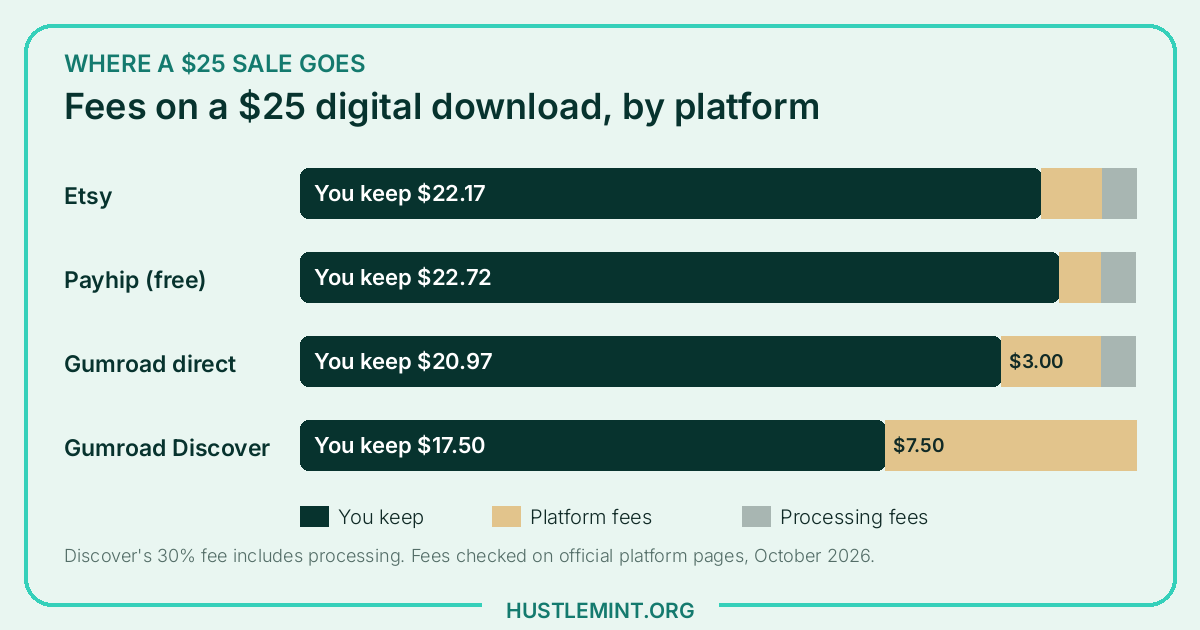
Assumptions for every table: a US seller, a digital download with no shipping, one sale per Etsy listing (so the listing fee lands on that sale). Figures checked on official pages, October 2026.
Etsy
Etsy brings built-in shopper traffic — and the longest fee stack:
- Listing fee: $0.20 per listing, charged whether or not the item sells. Listings expire after four months (renewing costs another $0.20), and a multi-quantity listing renews at $0.20 after each unit sells. For a digital download, that makes the listing fee behave like a per-sale charge in practice — which is how the tables below treat it.
- Transaction fee: 6.5% of the price (plus shipping/gift wrap if you charged them; US sellers don’t pay it on sales tax).
- Payment processing: 3% + $0.25 per order for US sellers.
- Regulatory operating fee: none for US sellers. (Etsy charges one in some countries — the US is not on its list.)
- Offsite Ads (the scenario to know): if a buyer found your product through Etsy’s offsite advertising, an additional 15% applies (12% for shops that have passed $10,000 in sales over the prior 365 days), capped at $100 per attributed order. It’s charged only on orders attributed to an ad click within 30 days — you can’t predict which sales it will hit, which is exactly why it belongs in your pricing cushion rather than your base math.
| Price | Listing | Transaction (6.5%) | Processing (3% + $0.25) | Total fees | You keep |
|---|---|---|---|---|---|
| $5.00 | $0.20 | $0.33 | $0.40 | $0.93 | $4.07 |
| $10.00 | $0.20 | $0.65 | $0.55 | $1.40 | $8.60 |
| $25.00 | $0.20 | $1.63 | $1.00 | $2.83 | $22.17 |
| $49.00 | $0.20 | $3.19 | $1.72 | $5.11 | $43.89 |
If an Offsite Ads fee lands on a sale, subtract roughly another 15% (or 12%) of the price: that $25 sale would net $18.42 instead of $22.17. Sellers who rely on Etsy should price so an occasional ads-attributed sale still leaves a margin they’re happy with. Our Etsy beginner guide covers setting up the shop itself.
Gumroad
Gumroad is the simple-stack option — no monthly fee, and it acts as merchant of record (more on that in the FAQ):
- Direct sales (your link, your audience): 10% + $0.50 platform fee, plus card processing of 2.9% + $0.30 charged on top.
- Discover marketplace sales: 30% flat, with processing included — you’re paying for Gumroad bringing you a buyer you didn’t have.
| Price | Platform fee | Processing | Total fees | You keep |
|---|---|---|---|---|
| Direct | ||||
| $5.00 | $1.00 | $0.45 | $1.45 | $3.55 |
| $10.00 | $1.50 | $0.59 | $2.09 | $7.91 |
| $25.00 | $3.00 | $1.03 | $4.03 | $20.97 |
| $49.00 | $5.40 | $1.72 | $7.12 | $41.88 |
| Discover | ||||
| $5.00 | $3.00 | included | $3.00 | $7.00 |
| $10.00 | $3.00 | included | $3.00 | $7.00 |
| $25.00 | $7.50 | included | $7.50 | $17.50 |
| $49.00 | $14.70 | included | $14.70 | $34.30 |
Read the two halves together: at $49, a Discover sale costs you $7.58 more than a direct sale. Discover can absolutely be worth it — a buyer you never reach otherwise is worth a commission — but send every buyer you can reach (your posts, your email list, your article links) to the direct link.
Payhip
Payhip’s free plan is the leanest stack in this guide — no monthly fee — but you bring your own traffic, and payments run through your own Stripe or PayPal account:
- Platform fee: 5% per sale on the free plan. (Paid plans lower the percentage in exchange for a monthly subscription — worth revisiting only once sales are steady.)
- Processing: charged by Stripe/PayPal at their standard rates, on top, on every plan — Payhip states this plainly in its pricing FAQ. The table uses Stripe’s standard US card rate of 2.9% + $0.30.
| Price | Platform fee (5%) | Processing (Stripe) | Total fees | You keep |
|---|---|---|---|---|
| $5.00 | $0.25 | $0.45 | $0.70 | $4.30 |
| $10.00 | $0.50 | $0.59 | $1.09 | $8.91 |
| $25.00 | $1.25 | $1.03 | $2.28 | $22.72 |
| $49.00 | $2.45 | $1.72 | $4.17 | $44.83 |
Payhip keeps the most per sale at every price point here — the trade-off is that nobody browses Payhip the way they browse Etsy. Its math rewards sellers who have (or are building) their own audience. Selling digital products for beginners covers choosing what to make.
The fixed-fee trap at low prices
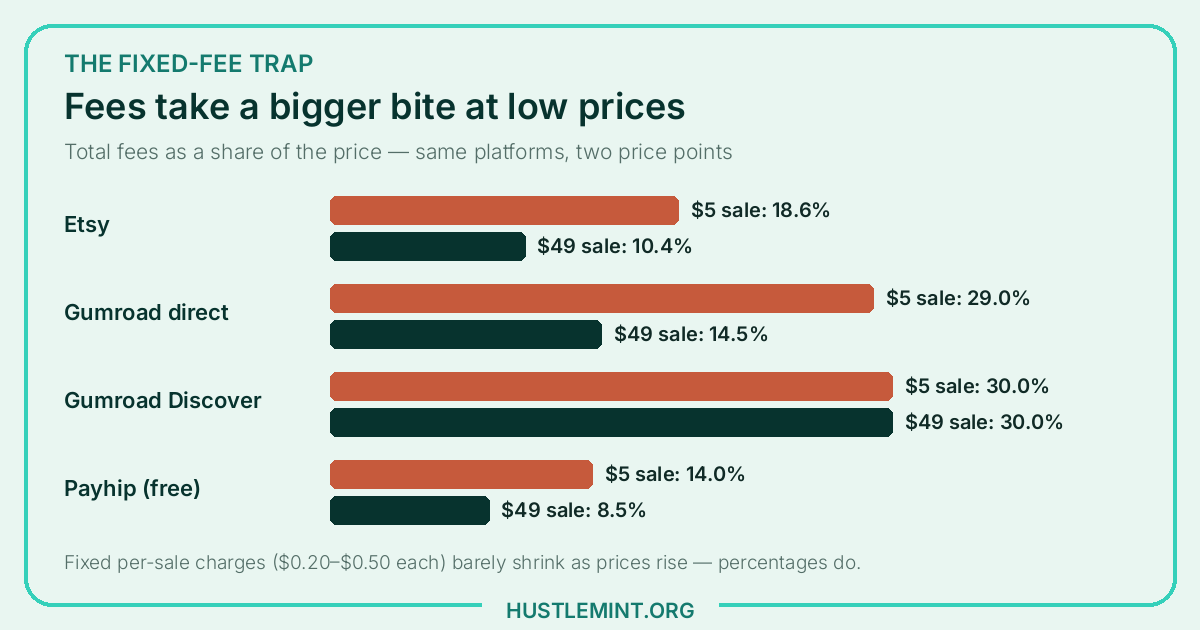
Look at the $5 column across the tables again. The percentages get the attention, but the quiet killers are the fixed charges: $0.50 here, $0.30 there, $0.25 there. On Gumroad direct, the fixed pieces alone ($0.50 platform + $0.30 processing) are $0.80 — 16% of a $5 price gone before any percentage applies. Etsy’s fixed pieces total $0.45; Payhip’s, $0.30.
Practical consequences:
- Very cheap products are structurally hard to sell profitably one at a time. A $3 download keeps roughly $1.81–$2.46 depending on the route — before your time.
- Bundles are the standard fix. Three $5 templates sold as one $15 bundle pay the fixed fees once. This is arithmetic, not marketing magic: the same content, one transaction.
- If a product only makes sense under $5, sell it where the fixed load is smallest — or use it as a free lead magnet that builds your email list instead of a product that earns pennies. (The free template pack in our late-payment email guide works exactly this way — a genuinely useful free version, offered with no strings.)

Anchors, bundles, and raising prices
Your fee floor sets the minimum. These widely used practices handle the rest — treat them as levers to test, not laws:
- Anchor with a fuller version. A standard version at your target price sells more comfortably next to a premium version (more templates, more formats, commercial rights) at a higher one. The premium version’s job is partly to make the standard look reasonable.
- Price the outcome, not the file. Buyers don’t value megabytes; they value the hour saved, the problem solved, the client won. Two sellers can charge $9 and $29 for similar-looking templates — the $29 one usually explains the outcome better.
- Raise prices in steps as proof accumulates. Reviews, testimonials, and your own confidence are assets. A common pattern is launching at your floor-plus-a-little, then raising once the product has buyers — rather than starting high with nothing to point to.
- Watch the take-home, not the price tag. A price increase that moves you to a route with worse fees can net less than a smaller increase on a lean route. Re-run your table whenever you change either.
The same discipline applies on the services side of your work, by the way — knowing your floor before you quote is the whole game in freelance pricing too.
FAQ
How much should I charge for my first digital product?
Start from your floor: pick your platform, find your take-home in its table, and set the price where what you keep feels worth the support and updates the product will need. A workable band for many first template/guide-type products is $9–$49 — not because the band is magic, but because below ~$9 the fixed fees bite hard, and above ~$49 buyers expect substantial depth and proof. If your floor math says you must charge more than the product can credibly carry, bundle or expand it rather than launching underpriced.
Do I have to charge sales tax on digital products?
It depends on how you sell — this is the merchant-of-record distinction. Gumroad acts as your merchant of record and, in its own words, will “automatically handle all sales tax collection and remittance worldwide.” Payhip states that it “automatically collects, reports and remits” US and Canadian sales tax (and EU/UK VAT) on your behalf — but the payment runs through your own Stripe/PayPal and you remain the legal seller. On Etsy, the platform handles marketplace sales-tax collection/remittance where the law requires it of marketplaces. None of this touches your income tax on profits, which is always yours to report. This is general information, not tax advice — as sales grow, a short conversation with a tax professional is money well spent.
Should I price at $9.99 or $10?
Honestly, it matters far less than your fee math. Charm pricing ($9.99) is a retail convention some sellers swear by; round prices read as simpler and more premium to others. What is certain: at $9.99 vs $10.00 your fees differ by less than a cent of percentages plus nothing on the fixed side — pick the style that fits your product and move on to things that move dollars, like bundles and routes.
Can I sell the same product on more than one platform?
Generally yes for your own original products — sellers routinely list on Etsy for discovery and sell direct through Gumroad or Payhip to their own audience. Keep two things straight: each platform’s terms govern what you can sell and how you can communicate with buyers there, so check them before cross-promoting between platforms; and your prices don’t have to match across platforms — many sellers keep one price for simplicity, but the fee tables above show why a platform-specific price can be rational.
How often should I revisit my prices?
Whenever a platform changes its fees (they announce changes; re-run your tables when they do), whenever you add substantial content to the product, and at least once a year as a habit. Pricing is maintenance, like updating the product itself.
Sources (official pages, checked October 2026)
- Etsy — Fees & Payments Policy: listing fee, transaction fee, Offsite Ads terms. Etsy Help Center: payment processing fees by country (US: 3% + $0.25); regulatory operating fee country list (US not listed).
- Gumroad — pricing page: “10% + 50¢ direct, 30% via Discover”; no monthly fee; merchant-of-record sales tax handling. Gumroad Help Center, fees article: processing charged on top of direct-sale fees; Discover fee includes processing.
- Payhip — pricing page and FAQ: free plan 5% per sale; PayPal/Stripe fees apply on all plans; sales tax collection/remittance wording; immediate payout to your own Stripe/PayPal.
- Stripe — pricing page: standard US card rate 2.9% + 30¢.
Fees change. This guide reflects the official pages as checked in October 2026 — confirm the current figures on the platform’s own fee page before you set prices you’ll rely on.